How to Convert AVIF to JPG Online 3 Easy Steps
Three steps. Under 30 seconds. Works on any device — desktop, phone or tablet.
Upload Your AVIF File
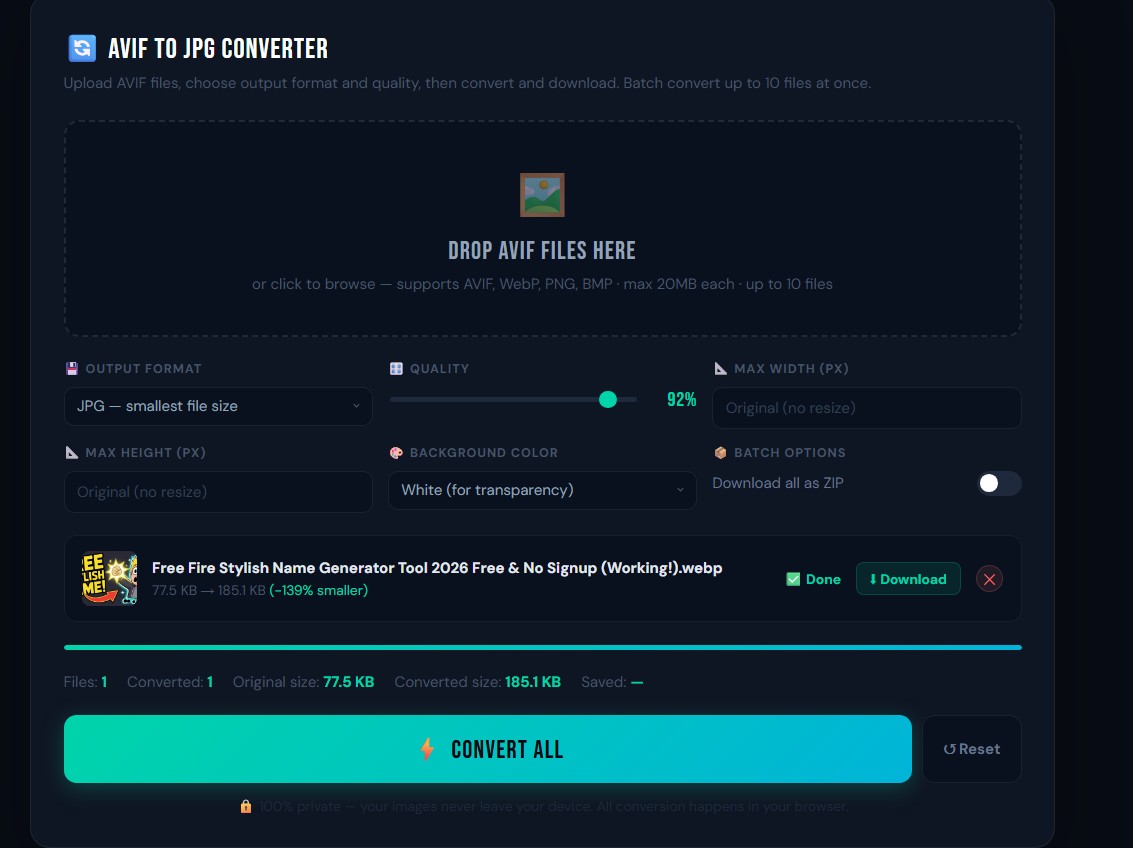
Click the upload area or drag and drop your AVIF images directly onto it. You can add up to 10 files at once each up to 20 MB.
Choose Format and Quality
Select JPG, PNG or WebP as your output. Set quality from 10–100% and optionally enter a max width or height to resize during conversion.
Convert and Download
Click Convert All. Each file shows the size saving. Download files one by one or toggle ZIP to grab them all at once.
What Makes This Free AVIF to JPG Converter Better
Built with the features you actually need nothing bloated, nothing hidden.
Batch Convert Up to 10 Files
Upload and convert 10 AVIF images in a single session with one click no need to repeat the process file by file.
3 Output Formats
Convert AVIF to JPG for photos and sharing, to PNG for transparent or lossless images, or to WebP for web-optimised output.
Adjustable Quality Control
Set output quality from 10% to 100%. The default 92% gives near-identical visual quality at a noticeably smaller file size.
Resize on Convert
Set a maximum width or height and the tool scales your image proportionally no cropping, no distortion, just a smaller output.
File Size Comparison
See the original and converted sizes side by side. Know exactly how much space you saved before you download anything.
Background Fill for Transparency
If your AVIF has a transparent background, choose white, black or keep it transparent (PNG output only) before converting.
100% Private No Uploads
Your images never leave your device. Everything runs locally in your browser using the HTML5 Canvas API completely offline.
Works on Mobile Too
Fully functional on iPhone, Android, iPad and any modern browser. Upload AVIF images straight from your camera roll no app needed.
AVIF to JPG When to Convert and Why It Matters
AVIF offers excellent image quality at tiny file sizes, but most apps, printers and social platforms still don't support it. Here's when converting to JPG or PNG makes the most sense.
When to Convert AVIF to JPG
- Sharing photos JPG opens on every device, app and platform without issues.
- Printing — Print shops and home printers need JPG or PNG, not AVIF.
- E-commerce Shopify, WooCommerce and Daraz work best with JPG or PNG uploads.
- Email attachments Most email clients cannot display AVIF images inline.
- Long-term archiving JPG will remain readable everywhere for decades.
When to Convert AVIF to PNG Instead
- Logos with transparency JPG fills transparent areas with white. PNG keeps them transparent.
- Screenshots with text PNG is lossless so text stays crisp and readable.
- Graphic design work Designers and print services often need lossless PNG files.
iPhone tip: Open this page in Safari, tap the upload area, select your AVIF images from Photos, set output to JPG at 92% quality, and download straight to your camera roll. The whole process takes under 30 seconds.
More Free Image Tools No Signup, No Watermark
Every tool is free, runs in your browser and requires no account.
Image Compressor
Reduce image file sizes by up to 90% without any visible quality loss. Perfect before uploading to WordPress or social media.
Use Free Tool →Background Remover
Remove image backgrounds automatically using AI. Works on portraits, product photos and objects.
Use Free Tool →AI Image Upscaler
Enlarge images up to 4× with AI no blurring, no pixelation. Great for old or low-resolution photos.
Use Free Tool →Image Cropper
Crop images to any size or aspect ratio ideal for social media thumbnails, profile pictures and print.
Use Free Tool →Image to PDF Converter
Convert JPG, PNG or WebP images to a PDF document in seconds. Batch conversion supported.
Use Free Tool →Image Rotation Tool
Rotate or flip images in any direction 90°, 180°, 270° or mirror. Instant, no quality loss.
Use Free Tool →Frequently Asked Questions AVIF to JPG Converter
Quick answers to the most common questions about converting AVIF images.
Is this AVIF to JPG converter really free?
Yes completely free, forever. There's no watermark on your converted images, no account required and no limit on how many times you can use it. Convert as many AVIF files as you need at no cost.
Why can't I open my AVIF file on my computer?
AVIF is a relatively new format and many older programs including Windows Photo Viewer and some macOS apps don't support it yet. Converting your AVIF to JPG makes it compatible with every device, app and platform instantly.
How many AVIF files can I convert at once?
You can upload and convert up to 10 AVIF files per session, each up to 20 MB. All files are converted with one click and you can download them individually or all at once with the ZIP option.
What quality setting should I use?
92% is the recommended setting for most uses. It looks visually identical to the original but produces a significantly smaller JPG file. Use 100% if you need maximum quality for example, for professional printing or graphic design.
Are my images uploaded to a server?
No. Everything happens inside your browser your images never leave your device. This tool uses the HTML5 Canvas API to convert files locally, so it even works offline once the page has loaded.
Can I keep the transparent background when converting AVIF?
Yes choose PNG as your output format and select Keep Transparent in the background colour setting. Note that JPG does not support transparency; if you convert a transparent AVIF to JPG, the transparent area will be filled with white (or your chosen background colour).
Ready to Convert Your AVIF Images?
Scroll up, drop in your files and get your JPGs in seconds free, no signup, nothing to install.
Go to AVIF Converter Tool ↑